
Zigbee vs Z-Wave vs Bluetooth vs WiFi | Which is best for your smart home?
Smart home systems rely on wireless protocols like Zigbee, Z-Wave, Bluetooth, and WiFi to connect and control devices. Each of these has unique advantages and disadvantages depending on factors such as range, speed, compatibility, and energy efficiency. This guide breaks down these protocols to help you decide which is best for your setup.
Comparison Table: Zigbee, Z-Wave, Bluetooth, and WiFi
| Feature | Zigbee | Z-Wave | Bluetooth | WiFi |
| Frequency | 2.4 GHz | 800-900 MHz | 2.4 GHz | 2.4/5 GHz |
| Range | Up to 100 meters | Up to 100 meters | Short-range (up to 10 meters) | Long-range, varies by router |
| Data Rate | Up to 250 kbps | Up to 100 kbps | Up to 3 Mbps | 100 Mbps to 1 Gbps |
| Power Consumption | Low, ideal for battery devices | Low, very efficient | Moderate to low (BLE) | High, best for powered devices |
| Mesh Networking | Yes, up to 65,000 nodes | Yes, up to 232 nodes | Limited (Bluetooth Mesh available) | Limited (mesh WiFi available) |
| Compatibility | Broad, open standard | Restricted to Z-Wave Alliance | Universal with BLE support | Universally compatible |
| Ideal Use Cases | Smart lighting, sensors | Security systems, smart locks | Wearables, speakers | Video streaming, internet access |
In-Depth Comparison of Each Protocol
1. Zigbee

2. Z-Wave

Operating on the sub-1GHz frequency band, Z-Wave avoids the crowded 2.4 GHz band, which minimizes interference and enhances connection stability. Z-Wave’s low power usage is ideal for battery-operated devices, and it offers robust interoperability due to strict certification standards. It supports a maximum of 232 devices, making it great for medium-sized smart home installations.
3. Bluetooth

Bluetooth, especially Bluetooth Low Energy (BLE), is optimal for close-range communication. It is highly energy-efficient, which suits wearables and small devices. Bluetooth lacks the range and scalability of Zigbee or Z-Wave but performs well for applications like smart locks, wearables, and personal audio.
4. WiFi

With its high data rate and universal compatibility, WiFi is ideal for bandwidth-intensive applications, such as streaming cameras and home assistants. While it consumes more power than Zigbee or Z-Wave, it provides seamless integration with internet-connected devices, making it popular in smaller setups that require high-speed connectivity.
How to choose Zigbee or Z-Wave or Bluetooth or WiFi for Your Smart Home?
Choosing between Zigbee, Z-Wave, Bluetooth, and WiFi for your smart home hinges on several factors: the size of your home, the type of devices, power efficiency needs, and your network’s data demands. Here’s a guide to help you make an informed decision:
1. Consider Your Home Size and Layout
- Zigbee: Ideal for larger homes, Zigbee uses a mesh network that supports up to 65,000 devices. Each device in the network acts as a repeater, helping the network cover a large area.
- Z-Wave: Works well in mid-sized homes, also with a mesh network but with a device limit of 232. Z-Wave's dedicated sub-1 GHz frequency can reduce interference, providing reliable connectivity in areas with WiFi congestion.
- WiFi: Best for small to medium homes. Though it doesn’t use mesh by default, WiFi can be extended with mesh routers. Its direct-to-router setup limits range without additional access points.
- Bluetooth: Suitable for small spaces. Bluetooth’s short range makes it best for close-range applications, such as locks, speakers, and wearables, typically in a single room or confined area.
2. Assess Power Efficiency and Device Requirements
- Zigbee and Z-Wave: Both protocols are energy-efficient and ideal for battery-powered devices like sensors, thermostats, and lights. Zigbee uses slightly less power, making it a better choice for energy-conscious users.
- WiFi: Power-hungry due to its high bandwidth. It’s best for devices that can stay plugged in, such as cameras and streaming devices.
- Bluetooth: Bluetooth Low Energy (BLE) is excellent for wearables and battery-powered devices that don’t require constant communication, conserving battery life.
3. Identify the Type of Devices You Need
- Security Applications: Z-Wave is often the top choice due to its AES-128 encryption, ideal for locks, alarms, and security systems.
- Lighting and Sensors: Zigbee is reliable for smart lighting and sensor networks, as it supports numerous devices in one network and offers efficient power use.
- High-Bandwidth Devices: For applications like video streaming, WiFi is the go-to due to its high data transfer rates.
- Wearables and Audio: Bluetooth is well-suited for wearables, speakers, and close-range smart devices, supporting lower data rates with efficient power use.
4. Determine Your Network's Complexity and Scalability Needs
- Zigbee and Z-Wave Hubs: Both protocols require a hub, but a multi-protocol hub can also unify them with WiFi or Bluetooth devices, making them easier to manage in a single app. This can streamline automation and monitoring for larger, more complex networks.
- WiFi Setup: Directly connects to your router, eliminating the need for a hub. A good WiFi router can handle multiple devices, though adding a mesh system can enhance coverage and reduce dead zones.
- Bluetooth: Ideal for minimal setups, Bluetooth does not require a hub but often benefits from app support for control and automation.
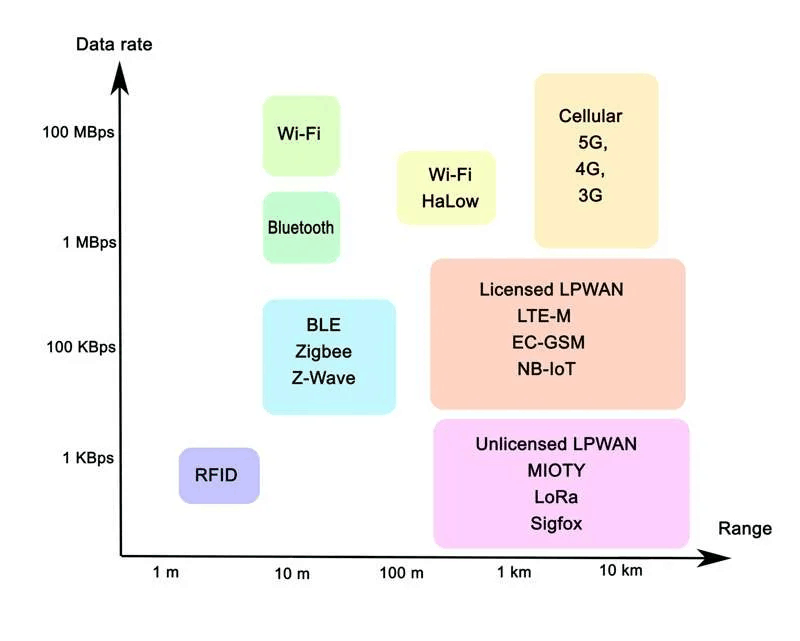
5. Consider Security and Interference Factors
- Z-Wave: Operates on a less crowded frequency (sub-1 GHz), reducing WiFi and Zigbee interference and providing stable performance in WiFi-heavy areas.
- Zigbee: Operates on the 2.4 GHz frequency, which can be crowded. However, Zigbee 3.0 addresses some interference concerns, and a dual-band WiFi router can help avoid overlap.
- WiFi: While widely supported, WiFi networks are more exposed to external threats due to internet connectivity. Secure your network with WPA2 or WPA3 encryption.
- Bluetooth: Short-range and typically isolated from internet access, Bluetooth’s exposure to interference and security risks is lower but is best suited to non-critical applications.
FAQs
1. Which protocol is the best for a large smart home setup?
Zigbee is ideal for large setups as it can support up to 65,000 devices within a single network. Its mesh network capability also ensures that each device strengthens the overall network by acting as a repeater. Z-Wave can support up to 232 devices, making it suitable for medium-sized networks, while WiFi and Bluetooth are best for small to moderate installations.
2. Is Z-Wave more secure than WiFi for smart home use?
Yes, Z-Wave is generally more secure because it uses AES-128 encryption. This high level of encryption makes it well-suited for devices where security is critical, such as door locks and security systems. WiFi also supports encryption (WPA2 and WPA3), but it connects to the internet, which can make it more vulnerable to external attacks if not properly secured.
3. Does Bluetooth work well for smart home applications?
Bluetooth is well-suited for close-range applications such as wearables, audio systems, and smart locks, especially with Bluetooth Low Energy (BLE), which conserves battery life. However, it lacks the extended range and mesh networking capabilities of Zigbee and Z-Wave, limiting its use in larger smart home systems.
4. Is WiFi a good choice for data-heavy smart devices like cameras?
Yes, WiFi is ideal for data-heavy applications, like video streaming on smart cameras, due to its high data transfer rates (up to 1 Gbps). However, WiFi requires more power, which is why it is best suited for devices that are plugged into a power source rather than battery-operated ones.
5. Which protocol is the most energy-efficient for battery-powered devices?
Zigbee, Z-Wave, and Bluetooth Low Energy (BLE) are all energy-efficient and work well with battery-powered devices. Zigbee and Z-Wave use low-frequency transmission, conserving battery life over time, while BLE is designed to be power-efficient for devices that remain in standby mode, such as smart locks and sensors.

6. Can I combine Zigbee, Z-Wave, and WiFi in a single smart home setup?
Yes, a multi-protocol hub, such as SmartThings or Hubitat, can integrate different protocols, allowing Zigbee, Z-Wave, and WiFi devices to work together seamlessly. This combination lets you take advantage of each protocol’s strengths and offers greater flexibility in selecting smart home devices.
7. Why do Zigbee and Z-Wave devices require a hub?
Zigbee and Z-Wave hubs act as central controllers, managing device connections and enabling communication across the network. These hubs also streamline smart home control, enabling automation and remote access through smartphone apps. WiFi devices, in contrast, connect directly to your home’s WiFi router without a hub.
8. Which protocol has the best range for a smart home?
WiFi offers the longest range, especially with mesh WiFi systems or repeaters. Zigbee and Z-Wave use mesh networking to extend range by relaying signals through other devices, ideal for larger homes. Bluetooth is limited in range (up to 10 meters) and is best for close-range applications.
9. How can I reduce interference with Zigbee devices?
To minimize interference, use a dual-band router (supporting both 2.4 GHz and 5 GHz) and avoid placing your Zigbee hub near WiFi routers. Additionally, using Zigbee 3.0 devices can improve network stability and reduce potential conflicts in crowded frequency environments.
10. Are WiFi smart devices more affordable than Zigbee and Z-Wave?
Generally, yes. WiFi-enabled devices are often more affordable because WiFi is a widely adopted standard, and additional hubs aren’t required. However, cost-effectiveness may depend on the quality of your router if many devices are connected. Zigbee and Z-Wave devices may cost more due to protocol-specific certifications and hub requirements.
11. How many devices can I connect to a single Z-Wave network?
A Z-Wave network can support up to 232 devices, suitable for moderate smart home setups. If more devices are needed, an additional hub and network expansion may be required, although many smart homes do not exceed this device count.
12. Can Zigbee and Z-Wave devices work together in the same home?
Yes, they can coexist in the same home when connected through a multi-protocol hub that can bridge their communication. This setup allows you to use the best devices from each protocol without interoperability issues, creating a more versatile smart home network.
13. Which protocol is simplest to set up for beginners?
WiFi is generally the easiest to set up because most homes already have a WiFi network, and no additional hubs are required. Devices can connect directly to the router, and smartphone apps facilitate control. Zigbee and Z-Wave require hubs, which add setup steps but offer more centralized control.
14. Can WiFi handle multiple smart devices efficiently?
Yes, WiFi can handle many smart devices if your router has the capacity. High-quality, dual-band routers or mesh systems are best for supporting multiple devices and ensuring that bandwidth-intensive applications like streaming and security cameras run smoothly.
Conclusion
Choosing the right protocol for your smart home depends on your unique needs. Zigbee and Z-Wave are well-suited for larger networks due to their mesh capabilities and energy efficiency, ideal for systems with many low-bandwidth devices. Bluetooth is best for short-range devices that prioritize low power consumption, while WiFi excels in high-speed, data-heavy applications like cameras. Balancing cost, ease of setup, and compatibility with existing infrastructure will help ensure a smooth and future-proof smart home experience.
The Ultimate Guide to Home Theater Lighting
Maximize Your Barber Shop's Appeal: How to Choose the Perfect Lighting
Related Article




Need an Instant Quote For Your Upcoming Projects?
Send us the details and we will get back to you within 12 hours.