
Why do LED Lights Flicker in the Camera?
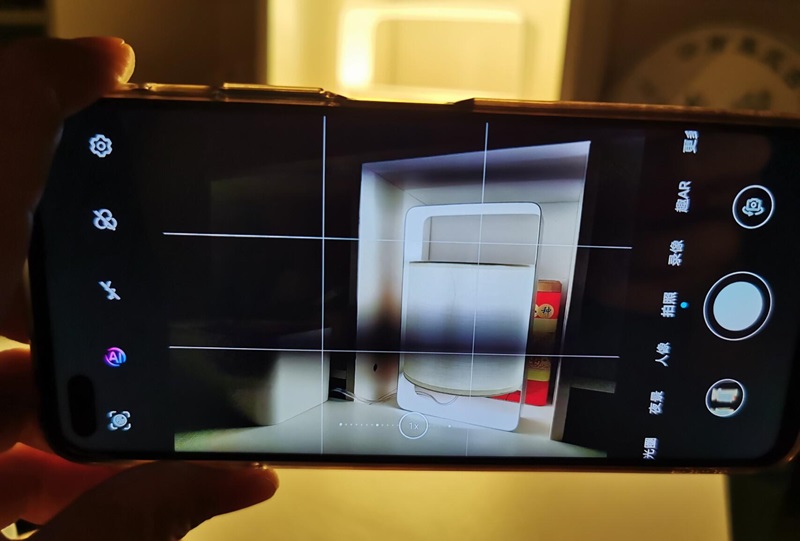
Imagine setting up a perfect shot, only to see the LED lights flickering in the footage. This issue can ruin a professional scene. Understanding why it happens can save you time and improve video quality.
This post explains why LED lights flicker on camera, the technical reasons behind it, and practical solutions. We'll cover LED basics, causes of flickering, technical insights, and solutions. We'll also answer common questions about LED flickering.
How LED Lights Work
LEDs, or Light Emitting Diodes, are semiconductor devices that emit light when an electric current passes through them. Unlike traditional incandescent bulbs, which use a filament, LEDs rely on the movement of electrons in a semiconductor material to produce light. This process is highly efficient, converting most of the energy into light rather than heat.
LEDs vs. Traditional Lighting
Traditional incandescent and fluorescent lights operate on different principles. Incandescent bulbs produce light by heating a filament until it glows, while fluorescent lights use a gas discharge to generate ultraviolet light, which is then converted to visible light by a phosphor coating. LEDs, on the other hand, are more energy-efficient, have a longer lifespan, and are more environmentally friendly. However, their electronic nature also makes them susceptible to flickering issues.
What is Flickering?

Causes of Flickering
Pulse Width Modulation (PWM)

Many LED lights use PWM to control brightness. PWM works by rapidly switching the LED on and off at a high frequency, which can cause visible flickering if the frequency is too low or if the camera’s frame rate interacts with it.
Power Supply Issues
Inconsistent power supply, such as fluctuations in voltage, can cause LEDs to flicker. This is often seen in low-quality power supplies or when LEDs are dimmed using incompatible dimmers.
Camera Shutter Speed
The camera’s shutter speed can capture the on-off cycles of LEDs, especially if the shutter speed is not synchronized with the LED’s frequency. This can create visible flickering in the footage.
Refresh Rates
Both LEDs and cameras have refresh rates—the frequency at which they update. If these rates are not synchronized, it can result in flickering. For example, an LED light operating at 60Hz may flicker when recorded by a camera set to a different frame rate.
Solutions to LED Flickering on Camera
Adjusting Camera Settings
Shutter Speed
Adjusting the camera’s shutter speed to match the LED’s frequency can help reduce flickering. For instance, setting the shutter speed to 1/50 or 1/60 of a second can synchronize with the common 50Hz or 60Hz frequencies of LED lights.
Frame Rate
Using a frame rate that matches the LED’s refresh rate can also minimize flickering. Experimenting with different frame rates (e.g., 24fps, 30fps, or 60fps) can help find the best match.
Using Flicker-Free LEDs

Flicker-free LEDs operate at higher frequencies or use stable power supplies to eliminate visible flickering. These LEDs are ideal for video production, providing consistent light without distractions.
High-Frequency Operation
Flicker-free LEDs operate at frequencies beyond the detection range of the human eye and standard cameras. This ensures stable light output, crucial for high-definition video and photography, where even minor flickering can be noticeable.
Stable Power Supplies
These LEDs use advanced drivers to regulate voltage and current, minimizing fluctuations that cause flickering. High-quality drivers ensure consistent power and uniform brightness, essential for maintaining visual quality in professional video production.
Market Availability and Applications
Flicker-free LEDs are marketed for their ability to eliminate flicker, making them easy to identify. They offer adjustable color temperatures, high Color Rendering Index (CRI), and flicker-free dimming. These LEDs are widely used in video production, live streaming, photography, and studio lighting.
FAQs
1. Why do some LED lights flicker more than others?
The quality of the LED drivers and components can vary significantly between products. High-quality LEDs use advanced drivers that maintain consistent power and reduce flickering, while lower-quality LEDs may suffer from inadequate power regulation and more pronounced flickering.
2. Can flickering harm the camera or the lights?
Flickering itself is unlikely to cause direct harm to either the camera or the LED lights. However, persistent flickering can lead to eye strain for viewers and create subpar video quality, indirectly affecting the perceived professionalism of your work.
3. Is flickering always visible to the naked eye?
No, flickering may not always be visible to the naked eye, especially if the frequency is high enough. However, cameras can capture flickering that is imperceptible to humans due to their ability to record at different frame rates and shutter speeds.

4. Can I use a filter or lens attachment to reduce flickering?
While some filters and lens attachments can help reduce flickering by diffusing the light or adjusting exposure, they are not always effective. The most reliable solutions involve adjusting camera settings or using flicker-free LED lights.
5. How can I test my LED lights for flickering before a shoot?
To test for flickering, you can use your camera or smartphone to record the LED lights at various settings. Adjust the frame rate and shutter speed to see if any flickering occurs. Additionally, some apps and tools are designed to detect flickering in lights, providing a more thorough analysis.
6. Does LED flickering affect slow-motion footage differently?
Yes, slow-motion footage, which involves higher frame rates, can make flickering more apparent. The increased frame rate captures more cycles of the LED’s modulation, exacerbating the flicker effect. Adjusting the LED’s frequency or using flicker-free LEDs can help mitigate this.
Conclusion
Understanding why LED lights flicker on camera involves examining the technology behind LEDs, the causes of flickering, and the technical factors at play. By adjusting camera settings and using flicker-free LEDs, you can minimize or eliminate flickering in your footage.
What Is The Difference Between UVA, UVB, And UVC LED?
Mastering TM-30-15: Everything You Need to Know About Light Quality
Related Article




Need an Instant Quote For Your Upcoming Projects?
Send us the details and we will get back to you within 12 hours.